Office Productivity Planner: A Structured System for Work Efficiency
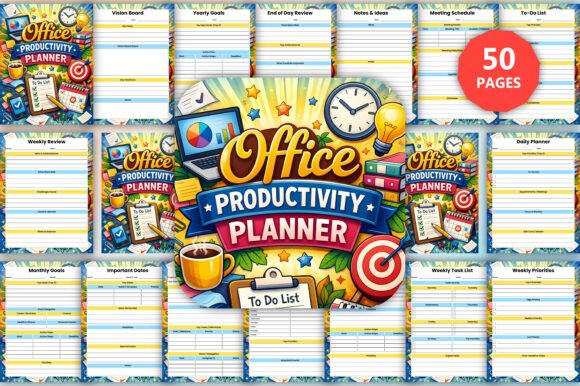
The Office Productivity Planner is a comprehensive tool designed to help professionals organize their work, manage tasks, and enhance daily productivity. Unlike traditional planners, this system offers a structured approach to planning, tracking, and maintaining focus throughout the workday. It combines goal setting, task management, project planning, and time tracking into one cohesive resource that supports individuals looking to streamline their workflow and achieve better results.
If you're someone who struggles with staying on top of deadlines, managing multiple projects, or keeping track of daily priorities, the Office Productivity Planner could be a valuable addition to your routine. It's particularly useful for those who need a centralized system to organize their professional lives while ensuring they remain productive and focused.
Key Features of the Office Productivity Planner
The planner includes several features aimed at improving efficiency and organization:
- Goal Setting Planning: Set yearly, monthly, and weekly goals with clear action plans to guide your progress.
- Daily, Weekly, Monthly Planning: Use structured layouts to organize schedules, prioritize tasks, and plan ahead effectively.
- Project Planning & Management: Plan projects, track milestones, assign tasks, and monitor progress in one place.
- Task Management: Manage to-do lists, set priorities, track deadlines, and ensure tasks are completed efficiently.
- Focus Productivity Tools: Includes tools like the focus planner, distraction tracker, and Pomodoro tracker to help maintain concentration.
- Time Tracking & Work Log: Track time usage and daily activities to improve overall efficiency.
- Meetings & Communication: Use meeting planner pages for agendas, notes, and follow-up tracking to stay organized during and after meetings.
- Progress & Performance Tracking: Monitor achievements, challenges, and improvements over time to refine your approach.
The planner also comes with editable Canva links, high-quality PDF files suitable for professional printing, and JPG files for versatile use. These features make it easy to customize and use the planner in various formats depending on your needs.
Why You Might Be Interested in the Office Productivity Planner
The Office Productivity Planner is ideal for professionals who want to take control of their workflow without relying on multiple apps or tools. It provides a single, unified system that covers all aspects of work planning and productivity. This can be especially beneficial for those who prefer physical planning tools or find digital tools overwhelming.
Additionally, if you're looking for a way to integrate goal setting with daily task management, this planner offers a seamless experience. The inclusion of time tracking and performance monitoring allows users to evaluate their progress and adjust their strategies accordingly.
Benefits and Tradeoffs
One of the main benefits of using the Office Productivity Planner is its ability to simplify complex workflows. By consolidating task management, project planning, and time tracking into one system, users can reduce the cognitive load associated with juggling multiple responsibilities. This can lead to increased efficiency, better time management, and improved focus on important tasks.
However, there are some tradeoffs to consider. Since it's a physical planner, users may find it less convenient than digital tools that offer real-time updates and synchronization across devices. Additionally, the effectiveness of the planner depends on consistent use and commitment to following through on the planning process.
Situations Where It May Be a Strong Fit
The Office Productivity Planner is well-suited for individuals who prefer hands-on, tactile planning methods. It works particularly well for professionals in fields such as project management, consulting, or creative industries where visual organization and structured planning are essential. It's also a good fit for teams that want to align their goals and tasks in a shared format.
For those who value personal accountability and prefer to see their progress visually, the planner's progress tracking features can be highly motivating. Its structured approach helps users break down large goals into manageable steps, making it easier to stay on track and measure success.
Situations Where Alternatives May Be Worth Considering
If you're someone who relies heavily on digital tools for task management, collaboration, or real-time data access, the Office Productivity Planner may not be the best fit. Digital tools like Trello, Asana, or Google Calendar often provide more flexibility in terms of customization, integration, and accessibility across multiple platforms.
Additionally, if you're working in an environment that requires frequent changes or updates to task assignments and timelines, a digital solution might be more efficient. The Office Productivity Planner is best suited for those who prefer a static, long-term planning approach rather than dynamic, ever-changing workflows.
Practical Decision-Making Insights
When deciding whether the Office Productivity Planner is right for you, consider your work habits, preferences, and the level of structure you require. If you thrive in a structured environment and prefer a tangible, visual method of planning, this planner can be a powerful tool. However, if you need real-time updates, team collaboration, or mobile access, you may want to explore digital alternatives.
Another factor to consider is how much time and effort you're willing to invest in organizing and maintaining the planner. While it offers a structured system, its effectiveness depends on regular use and adherence to the planning process. If you're committed to making it part of your routine, the benefits can be significant.
In conclusion, the Office Productivity Planner is a structured, comprehensive system that can help professionals organize their work, manage tasks, and improve daily productivity. Whether it's the right choice for you depends on your specific needs, preferences, and workflow requirements. By evaluating your current systems and considering the planner's features, you can determine whether it aligns with your goals and enhances your overall efficiency.